 Cart (0)
DESCRIPTION
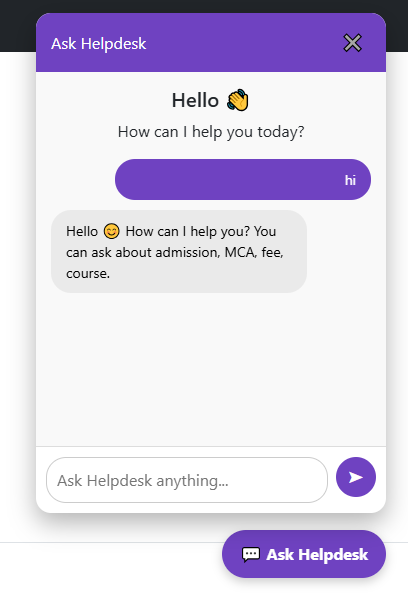
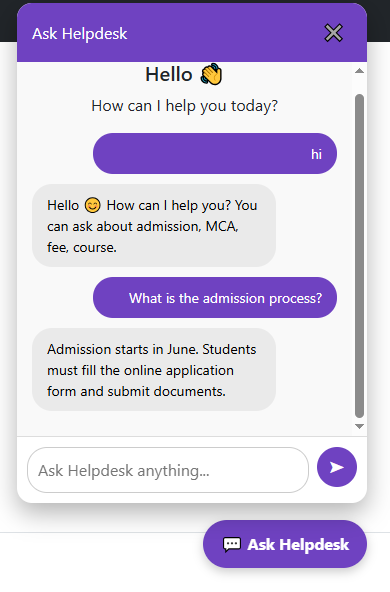
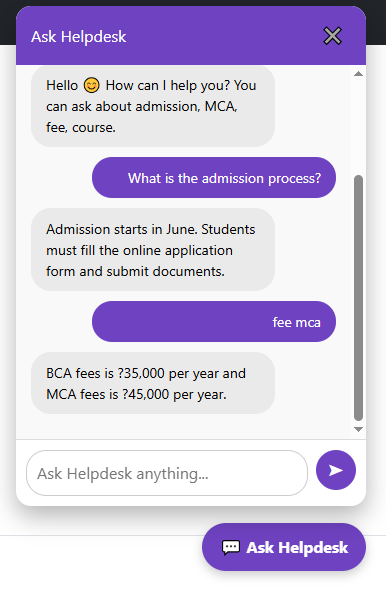
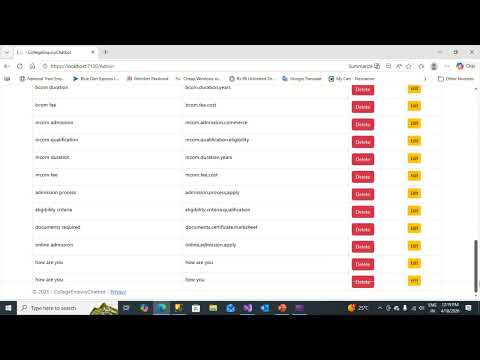
School / College Admission Chatbot with Admin Module Introduction In today’s digital era, educational institutions such as schools, colleges, and universities are facing an increasing number of student enquiries related to admissions, eligibility criteria, course details, fees, duration, and required documents. Handling these queries manually consumes a significant amount of time and manpower. To overcome this problem, an automated solution is required that can respond to student queries instantly and accurately. The School / College Admission Chatbot Project is designed to provide an intelligent, automated, and user-friendly platform that answers admission-related questions 24×7. The chatbot is developed using ASP.NET Core MVC with SQL Server as the backend database. The system includes a fully functional Admin Module, which allows administrators to manage chatbot questions and answers efficiently and securely. Purpose of the Project The primary purpose of this project is to automate the admission enquiry process and reduce the workload of administrative staff. The chatbot acts as a virtual admission assistant that interacts with users and provides quick responses. Another important objective of this project is to allow non-technical administrators to manage chatbot content without modifying the source code. This is achieved through the Admin Module, where questions, answers, and keywords can be added, updated, or deleted easily. Overview of the System The system consists of two main modules: User Chatbot Module Admin Module The User Chatbot Module allows students or visitors to type their questions in natural language. The chatbot processes the input, searches for relevant keywords or matching questions in the database, and returns the most appropriate answer. The Admin Module is a secure backend panel that allows authorized users to manage chatbot data. It ensures that the chatbot always provides updated and correct information. User Chatbot Module The User Chatbot Module is the front-facing component of the system. Users can ask questions related to: Admission process Eligibility criteria Course details (B.Sc, M.Sc, BCA, MCA, BA, MA, B.Com, M.Com, etc.) Duration of courses Required documents Fee structure The chatbot supports greeting detection such as “Hi”, “Hello”, or “Namaste” and responds politely. It also ignores meaningless inputs such as single characters and handles spelling mistakes using a Levenshtein Distance algorithm. This improves user experience and ensures accurate responses even if the user makes typing errors. Keyword Matching and Spell Correction The chatbot uses a keyword-based matching technique. Each question stored in the database is associated with relevant keywords. When a user submits a question, the system compares the input with stored questions and keywords to find the best possible match. Additionally, spell correction is implemented to handle incorrect spellings. This feature allows the chatbot to understand user intent even when words are typed incorrectly, making the system more user-friendly. Admin Module The Admin Module is the most important part of the project, as it controls the chatbot’s knowledge base. Only authorized administrators can access this module through a secure login system. Admin Login The admin must enter a valid username and password to access the admin panel. Authentication is performed using database verification. If the login is successful, a session is created, and the admin is redirected to the dashboard. Unauthorized users are denied access. Admin Dashboard The dashboard provides an overview of chatbot data and administrative options. From the dashboard, the admin can manage all chatbot operations easily. Upload New Questions and Answers The admin can add new questions, answers, and keywords related to courses and admissions. This allows the chatbot to expand its knowledge without requiring any code changes. Edit Questions and Answers This feature allows the admin to update existing chatbot responses. Admission rules and course details often change, so editing ensures the chatbot always provides current information. Delete Questions and Answers Admins can remove outdated or incorrect questions from the database. This keeps the chatbot database clean and accurate. View All Chatbot Data Admins can view all stored chatbot questions and answers in a structured format. This helps in monitoring and managing chatbot content effectively. Secure Admin Panel Security is a major concern in any web application. The admin panel is protected using authentication and session management. Unauthorized users cannot access admin pages directly. The logout feature destroys the admin session to prevent misuse. Database Design The system uses SQL Server as the backend database. The main tables include: Admin Table: Stores admin login credentials ChatbotQA Table: Stores chatbot questions, answers, and keywords This structured database design ensures efficient data retrieval and easy management. Advantages of the System Provides instant responses to admission queries Reduces manual workload of staff 24×7 availability Easy to update chatbot knowledge through admin panel Secure and scalable system Limitations The chatbot is rule-based Limited to stored data Supports only English language Future Enhancements Integration with AI and NLP technologies Multilingual support (Hindi, English, etc.) Voice-based chatbot Mobile application integration Advanced analytics for user queries Conclusion The School / College Admission Chatbot with Admin Module is an effective solution for automating admission-related enquiries. It provides fast, accurate, and reliable information to users while allowing administrators to manage chatbot data securely. This project demonstrates the practical implementation of web technologies, database management, and basic artificial intelligence concepts. It is highly suitable for educational institutions seeking digital transformation in their admission process
QUANTITY
7 day return policy
100% safe & protected
Product Highlights
Premium Quality
Crafted with the finest materials for lasting quality.
Precision Design
Every detail carefully considered and refined.
Customer First
Your satisfaction is our top priority always.
Long Lasting
Built to endure everyday use with ease.